Wednesday, November 10, 2010
Recovering from iPhoto '11
I spent 48 hours in recovering from the mess made by iPhoto '11. If you are suffering from the upgrade, you are welcome to try the remedies I used.


Saturday, November 6, 2010
iPhoto 11 sucks - do not upgrade!
I made a big mistake last week. I hastily upgraded to iLife '11. Who wouldn't be attracted by Apple's slick marketing? Apple used to design applications keeping the end user in mind. Clearly that is not the case anymore. Apple now designs applications to throw in more features and releases applications without any proper testing. Net result - iLife 11 is a SHODDY JOB. This is the clumsiest interface that I've ever seen.
I shall not even begin to describe the nightmare I'm facing. To my dismay, my Time Machine backup disk failed, so I don't have a proper backup and can't roll back to iPhoto '09 easily. I am faced with a terrible task of having to downgrade my iPhoto library almost manually, since I clearly cannot live with iPhoto '11.
So dear friends and readers, sit out on this version of iLife and iPhoto '11. It is definitely not worth it. Let Steve Jobs get back to the bloody Mac and get his act together. For now, they seem to be just an iGadget company.
Sunday, October 3, 2010
Flickr Set Manager

From time to time, I stumble across something innovative and useful. My recent find was Flickr Set Manager from dopiaza.org. This is something Flickr should have implemented on their own. I have a feeling that Flickr's gone a bit lazy even though they are making money by charging $25 a year for their pro services.
Anyway, back to Flickr Set Manager. FSM is something like "smart sets" for your photos. FSM manages your sets on a daily basis. You can choose the kind of pictures to be included in your sets based on keywords, interestingness, location, tags, text, etc.
I use it for maintaining a set of my most "interesting" photos. I highly recommend this for all Flickr users.
Looking for details? Get the FAQs :)
Preview of Flickr Uploadr 3.3 for Mac OS X
A couple of weeks ago, I posted my woes about the current Flickr Uploader (v 3.2.1) and ended up patching it myself. Now, there's a new better maintained version already in Flickr's App Garden. I wish the Flickr staff would test it and make it an official version.
Direct download link here.
Application page here.
Update: I tried it out and it works very well! I love the photo zoom slider feature on it.
Sunday, September 19, 2010
Flickr Uploadr for Mac OS X - fixed

I upload all my Flickr photos using Flickr Uploadr for the Mac v3.2.1. Things had been working fine until two days ago. On September 18th, Flickr Uploadr crashed upon launch. Every time I tried to launch it, it would crash within five seconds. I use Mac OS X Snow Leopard 10.6.4. I am pretty sure that it wasn't the software update that broke it, but something else.
I tried all the usual "software first-aid". Delete preferences, caches, application support settings. Re-install the application. Nothing worked. In fact, Flickr Uploadr would crash even before it signed into Flickr!
I wasted almost 12 hours over a period of two days trying to figure out how to fix things. Flickr Uploadr is Flickr's recommended desktop uploader of choice. However, they haven't updated the tool since June 2009. The only documentation that exists is in form of users pouring their woes out on Flickr forums. I loathe forums. One has to sift through piles of clueless rubbish to actually figure out what the proper issue is. And then, there's a 5% chance that the forum will have a proper solution in it.
Here is a forum thread where other users have complained about the same problem.
Flickr staff have washed their hands off the project with the following statement:
The desktop Uploadr is not in active development at this time, so it might be best to try one of the 3rd party applications in the App Garden if you would prefer to use a desktop client rather than our web uploadersI decided to look under the hood and try to fix things myself. After some debugging, I realised that the component at fault was XULrunner - a framework upon which Flickr Uploadr is built. I then replaced the XULrunner framework with the latest version (v1.9.2 as of this writing).
And to help out Mac users in the Flickr community who are heavily dependent upon Flickr Uploadr, I have created a ZIP file of my "stabililzed" Flickr Uploadr which can be downloaded from:
http://saumil.net/howto/flickruploadr/Flickr_Uploadr_saumil19092010.zip
Unzip the file and copy the Flickr Uploadr App into your Applications Folder. Hopefully, it should work. Note - this application has only been tested on my Mac (Mac OS X 10.6.4 - Intel). I would appreciate it if you can confirm whether this works or not.
Wednesday, January 20, 2010
iPhoto Flickr and Geo-location
Today I tried using iPhoto 09's built in Flickr upload feature. Setup was easy. I had to add iPhoto as a trusted application in my Flickr account, which was automatically prompted for when I enabled the Flickr upload feature.
After uploading my first set of photos, I noticed that the geographic location data associated with the pictures didn't make it to Flickr. Upon searching, I found that I needed to enable Flickr to "Automagically import GPS information as geo data" in my account settings. Once that was done, Flickr picked up iPhoto's location data from the pictures.

After uploading my first set of photos, I noticed that the geographic location data associated with the pictures didn't make it to Flickr. Upon searching, I found that I needed to enable Flickr to "Automagically import GPS information as geo data" in my account settings. Once that was done, Flickr picked up iPhoto's location data from the pictures.

Sunday, November 29, 2009
Firefox 3.5/3.6 Color management - a step backwards
For whatever stupid reason, Firefox 3.5 and the upcoming 3.6 beta have decided to drop proper ICC4 colour management in their rendering engines. Firefox 3.5 only supports ICC2, and apparently, ICC4 support is still missing from Firefox 3.6.
So there we are, back to mismatched colours, back to the dull shades, back to what IE used to show. I personally have no idea why the "geniuses" at Mozilla decided to take this step backwards, and I don't think they're going to do anything about it either. Their reason states that the new colour management engine - QCMS - doesn't support ICC4 yet. Sadly, the thread states that it is "solved and closed". Far from it. So, we shall have to wait until the QCMS engine matures to something that was working quite well for the past few years.
So there we are, back to mismatched colours, back to the dull shades, back to what IE used to show. I personally have no idea why the "geniuses" at Mozilla decided to take this step backwards, and I don't think they're going to do anything about it either. Their reason states that the new colour management engine - QCMS - doesn't support ICC4 yet. Sadly, the thread states that it is "solved and closed". Far from it. So, we shall have to wait until the QCMS engine matures to something that was working quite well for the past few years.
Monday, September 21, 2009
6 ways to improve your photography
This is a sarcastic article. I am fed up with photography sites regurgitating the same garbage over and over again - publishing their articles with misleading headings to catch attention. No matter what, they end up re-iterating "use the rule of thirds", "try a different angle", "capture candid moments", etc. etc.
However, here is something that a sincere user posted somewhere on Digg:
If you know how to defend your photos, you don't need to learn how to take good photos. Here's how to defend your photo to make it look good:
However, here is something that a sincere user posted somewhere on Digg:
If you know how to defend your photos, you don't need to learn how to take good photos. Here's how to defend your photo to make it look good:
- Weird = Abstract
- Overexposed = High key
- Badly composed = Lomo style
- Overprocessed = Artistic HDR
- Snapshot = Capturing the moment
- Shaky hands = Dramatic blurring
Sunday, August 23, 2009
Canon Tethered shooting from Windows
 Cute Canon Capture is an open source and free program to control your Canon camera using a USB cable.
I haven't tried it personally, but I can see it being extremely useful in certain situations, especially studio product photography.
Cute Canon Capture runs on Windows only (sad) and works on the following Canon camera models:
- PowerShot A620
- PowerShot S80
- PowerShot S3 IS
- PowerShot G7
- PowerShot A640
- PowerShot S5 IS
- PowerShot G9
- PowerShot SX100 IS
- PowerShot G10
- PowerShot SX110 IS
Long Distance Camera Trigger

Here's a simple DIY project on how to turn a pair of walkie talkies into a long distance camera trigger, especially for photographing wildlife.
LifeHacker article
flickr page with do-it-yourself instructions.
Tuesday, June 2, 2009
Retro Polaroid Photography

If there's something that digital cameras of today lack, it is the charm of the old classic cameras. Black and white prints, faded colours, old memories. At times, it is nice to lose some details for nostalgia's sake.
One of my favourite programs these days is Poladroid. It converts your digital pictures into Polaroid-like prints, with a striking resemblance to Polaroid photography of the 80s. Polaroid photos are square and printed on chemically treated paper that develops instantly. There's some vignetting, difference in colours and an overall casual feeling to photos taken with a Polaroid camera.
Poladroid brings it all back! And with the same recklessness as a regular Polaroid camera.
Here are some pictures taken with a regular digital camera, processed by Poladroid.


More pictures can be found on Flickr's "Be Poladroid" group.
Download Poladroid (for Mac and Windows)
Friday, May 22, 2009
Photos less vibrant in your browser?
Do you experience a loss of vibrancy and flat colours in your photos when you view them through your browser? If so, then read on.
I noticed this problem when I began uploading photos to my Flickr account. My photos looked spectacular in PhotoShop and iPhoto, but when viewed from Flickr, the colours appear really flat and dull.
The problem lies in whether or not browsers use the photos' embedded colour profiles.
Firefox doesn't use embedded ICC colour profiles by default. Safari uses embedded colour profiles. My flickr photos viewed through Safari appear rich and vibrant.
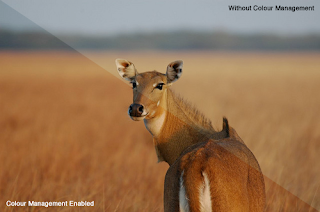
These two photos show the difference clearly:

Does your browser support embedded colour profiles? Here's a quick test. Click the URL below and look at the image.
http://www.color.org/version4html.xalter
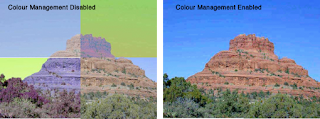
If you see one proper image, then your browser is fine! If you see the image broken up into four quadrants, then your browser needs fixing. Read my notes on possible "solutions" below.
Solution:
First, if you are using Internet Explorer, Opera or Google Chrome, as of May 2009, you are out of luck. Better get used to looking at dull and flat colours. After all, you ARE using hopeless browsers.
Safari supports embedded colour profiles by default. No action required. Close this window and enjoy the Internet.
Firefox 3.0 and above supports the use of embedded colour profiles, but some "visionaries" at Mozilla chose to leave that feature disabled. So, for Firefox, we have to tweak some settings to enable the use of embedded ICC colour profiles.
Step 1: Type "about:config" in Firefox's address bar.
Step 2: In the Filter text box, search for "gfx".
Step 3: Set "gfx.color_management.enabled" to "true" by double clicking anywhere on that line.

Instructions from LifeHacker on how to do this.
Firefox 3 Colour Profile support from dria.org.
If you think this is too complicated, try Sean Hayes' Color Management Firefox extension for doing this.
I noticed this problem when I began uploading photos to my Flickr account. My photos looked spectacular in PhotoShop and iPhoto, but when viewed from Flickr, the colours appear really flat and dull.
The problem lies in whether or not browsers use the photos' embedded colour profiles.
Firefox doesn't use embedded ICC colour profiles by default. Safari uses embedded colour profiles. My flickr photos viewed through Safari appear rich and vibrant.
These two photos show the difference clearly:


Does your browser support embedded colour profiles? Here's a quick test. Click the URL below and look at the image.
http://www.color.org/version4html.xalter
If you see one proper image, then your browser is fine! If you see the image broken up into four quadrants, then your browser needs fixing. Read my notes on possible "solutions" below.

Solution:
First, if you are using Internet Explorer, Opera or Google Chrome, as of May 2009, you are out of luck. Better get used to looking at dull and flat colours. After all, you ARE using hopeless browsers.
Safari supports embedded colour profiles by default. No action required. Close this window and enjoy the Internet.
Firefox 3.0 and above supports the use of embedded colour profiles, but some "visionaries" at Mozilla chose to leave that feature disabled. So, for Firefox, we have to tweak some settings to enable the use of embedded ICC colour profiles.
Step 1: Type "about:config" in Firefox's address bar.
Step 2: In the Filter text box, search for "gfx".
Step 3: Set "gfx.color_management.enabled" to "true" by double clicking anywhere on that line.

Instructions from LifeHacker on how to do this.
Firefox 3 Colour Profile support from dria.org.
If you think this is too complicated, try Sean Hayes' Color Management Firefox extension for doing this.
Friday, May 15, 2009
Nikon Tethered Shooting from your Mac

This is a Mac OS X and Nikon specific post. I came across this application called Sofortbild, which allows "tethered shooting" from your Mac. Tethered shooting simply means remote controlled shooting using your computer and a camera connected by a USB cable or wirelessly.
Sofortbild works with most Nikon DSLRs. This could be extremely useful in time-lapse photography.
Sofortbild Screenshot
Personally I find Sofortbild better than Nikon's own Nikon Control. Why? Cause its FREE!
Thursday, May 7, 2009
Camerapedia

While researching the genealogy of my grandfather's Nikomat FTN, I came across this lovely encyclopedia of cameras, aptly named Camerapedia.org.
Camerapedia is free-content encyclopedia of camera information, a repository of information about all still camera brands and models.
http://camerapedia.org/
Sunday, February 1, 2009
CHDK Canon Hacker's Development Kit

CHDK or the Canon Hacker's Development Kit is an ultimate firmware add-on for many Canon digital cameras. It turns your simple point-and-shoot camera into a powerhouse. It lets you control advanced settings, record time lapse videos, run scripts and many other impressive features. And best of all, CHDK doesn't destroy your camera's existing firmware.
To load CHDK, all you have to do is copy the CHDK program image onto the media card (usually an SD card) and insert it in your Canon camera and start it up. The camera will automatically detect and load the new program. To stop using CHDK, all you have to do is delete the file from the SD card.
Lifehacker carried an excellent article on supercharging your Canon point-and-shoot using CHDK. Here's another article on HackADay. I recommend you try it out!
Thursday, January 1, 2009
My little Canon SD 1000

I'm a photoholic. If there's a picture presenting itself, it burns my heart not to have a camera handy. Toting my SLR around everywhere is cumbersome (but I still do it). My essential camera gear consists of an SLR, a zoom lens, a small tripod (sometimes) and most important of all, a small point-and-shoot camera.
The last item is very important. There have been times where taking the SLR along isn't possible - first time snowboarding, roller coasters, etc. I always travel with a small point-and-shoot camera in my backpack, be it on business or pleasure. And that has helped me capture some very interesting pictures.
When it comes to small point-and-shoot cameras, none beat Canon, in my opinion and experience. I've always been a Canon and Nikon guy - these companies know how to make good cameras. They have experience with photography and optics. Many of my friends and relatives judge cameras by simply falling for the megapixel rating. To me, it isn't as important as good quality optics.
I've owned a Canon Digital Elph II in the past. Sadly, it's battery life has come to an end. It was a 2 megapixel camera which has served me well. I replaced with the Canon's SD 1000 in August 2007. The SD 1000 is compact, yet powerful enough for my needs.
Digital Photography Review carries an excellent article on the SD1000.
Thursday, December 25, 2008
Nikon D70 Firmware

I have owned a Nikon D70 since over 4 years now. For all D70/D70s owners, I do recommend updating the camera's firmware to the new 2.0 version. Digital Photography Review's article on the new firmware can be found here.
Nikon's technical support describes how to apply the firmware to your D70/D70s.
Subscribe to:
Posts (Atom)


