Showing posts with label flickr. Show all posts

Sunday, October 3, 2010

Flickr Set Manager


From time to time, I stumble across something innovative and useful. My recent find was Flickr Set Manager from dopiaza.org. This is something Flickr should have implemented on their own. I have a feeling that Flickr's gone a bit lazy even though they are making money by charging $25 a year for their pro services.

Anyway, back to Flickr Set Manager. FSM is something like "smart sets" for your photos. FSM manages your sets on a daily basis. You can choose the kind of pictures to be included in your sets based on keywords, interestingness, location, tags, text, etc.

I use it for maintaining a set of my most "interesting" photos. I highly recommend this for all Flickr users.

Looking for details? Get the FAQs :)

Preview of Flickr Uploadr 3.3 for Mac OS X

A couple of weeks ago, I posted my woes about the current Flickr Uploader (v 3.2.1) and ended up patching it myself. Now, there's a new better maintained version already in Flickr's App Garden. I wish the Flickr staff would test it and make it an official version.

Direct download link here.

Application page here.

Update: I tried it out and it works very well! I love the photo zoom slider feature on it.

Sunday, September 19, 2010

Flickr Uploadr for Mac OS X - fixed


I upload all my Flickr photos using Flickr Uploadr for the Mac v3.2.1. Things had been working fine until two days ago. On September 18th, Flickr Uploadr crashed upon launch. Every time I tried to launch it, it would crash within five seconds. I use Mac OS X Snow Leopard 10.6.4. I am pretty sure that it wasn't the software update that broke it, but something else.

I tried all the usual "software first-aid". Delete preferences, caches, application support settings. Re-install the application. Nothing worked. In fact, Flickr Uploadr would crash even before it signed into Flickr!

I wasted almost 12 hours over a period of two days trying to figure out how to fix things. Flickr Uploadr is Flickr's recommended desktop uploader of choice. However, they haven't updated the tool since June 2009. The only documentation that exists is in form of users pouring their woes out on Flickr forums. I loathe forums. One has to sift through piles of clueless rubbish to actually figure out what the proper issue is. And then, there's a 5% chance that the forum will have a proper solution in it.

Here is a forum thread where other users have complained about the same problem.

Flickr staff have washed their hands off the project with the following statement:

The desktop Uploadr is not in active development at this time, so it might be best to try one of the 3rd party applications in the App Garden if you would prefer to use a desktop client rather than our web uploaders
I decided to look under the hood and try to fix things myself. After some debugging, I realised that the component at fault was XULrunner - a framework upon which Flickr Uploadr is built. I then replaced the XULrunner framework with the latest version (v1.9.2 as of this writing).

And to help out Mac users in the Flickr community who are heavily dependent upon Flickr Uploadr, I have created a ZIP file of my "stabililzed" Flickr Uploadr which can be downloaded from:

http://saumil.net/howto/flickruploadr/Flickr_Uploadr_saumil19092010.zip

Unzip the file and copy the Flickr Uploadr App into your Applications Folder. Hopefully, it should work. Note - this application has only been tested on my Mac (Mac OS X 10.6.4 - Intel). I would appreciate it if you can confirm whether this works or not.

Wednesday, January 20, 2010

iPhoto Flickr and Geo-location

Today I tried using iPhoto 09's built in Flickr upload feature. Setup was easy. I had to add iPhoto as a trusted application in my Flickr account, which was automatically prompted for when I enabled the Flickr upload feature.

After uploading my first set of photos, I noticed that the geographic location data associated with the pictures didn't make it to Flickr. Upon searching, I found that I needed to enable Flickr to "Automagically import GPS information as geo data" in my account settings. Once that was done, Flickr picked up iPhoto's location data from the pictures.

Friday, May 22, 2009

Photos less vibrant in your browser?

Do you experience a loss of vibrancy and flat colours in your photos when you view them through your browser? If so, then read on.

I noticed this problem when I began uploading photos to my Flickr account. My photos looked spectacular in PhotoShop and iPhoto, but when viewed from Flickr, the colours appear really flat and dull.

The problem lies in whether or not browsers use the photos' embedded colour profiles.

Firefox doesn't use embedded ICC colour profiles by default. Safari uses embedded colour profiles. My flickr photos viewed through Safari appear rich and vibrant.

These two photos show the difference clearly:
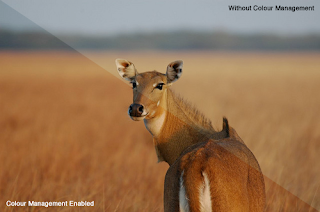


Does your browser support embedded colour profiles? Here's a quick test. Click the URL below and look at the image.

http://www.color.org/version4html.xalter

If you see one proper image, then your browser is fine! If you see the image broken up into four quadrants, then your browser needs fixing. Read my notes on possible "solutions" below.
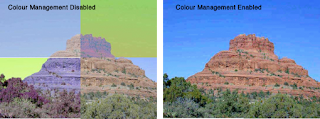


Solution:

First, if you are using Internet Explorer, Opera or Google Chrome, as of May 2009, you are out of luck. Better get used to looking at dull and flat colours. After all, you ARE using hopeless browsers.

Safari supports embedded colour profiles by default. No action required. Close this window and enjoy the Internet.

Firefox 3.0 and above supports the use of embedded colour profiles, but some "visionaries" at Mozilla chose to leave that feature disabled. So, for Firefox, we have to tweak some settings to enable the use of embedded ICC colour profiles.

Step 1: Type "about:config" in Firefox's address bar.

Step 2: In the Filter text box, search for "gfx".

Step 3: Set "gfx.color_management.enabled" to "true" by double clicking anywhere on that line.


Instructions from LifeHacker on how to do this.
Firefox 3 Colour Profile support from dria.org.

If you think this is too complicated, try Sean Hayes' Color Management Firefox extension for doing this.